AI Girlfriend Voice Chat & Voice Messages: Complete Guide
Text chat is where most AI girlfriend relationships start, but voice is where they start to feel real. This guide explains how AI girlfriend voice messages and voice chat actually work, how to get your companion to send you a voice note, and what separates a good voice experience from a robotic one.
If you have only ever texted with an AI companion, you are experiencing about half of what the technology can do. A written "good morning" is nice. The same words in her voice, with a sleepy warmth in them, land completely differently — your brain processes tone, pace, and breathiness in ways plain text can never trigger.
Below I break down the three ways you can hear an AI girlfriend's voice, what happens technically when she "records" a voice message for you, and a few tricks most users never discover.
The three ways to hear your AI girlfriend's voice
Voice shows up in three distinct forms on modern AI companion platforms, ordered here from casual to fully immersive.
1. Voice messages you ask for
The simplest way: just ask. On xeve.ai you can type something like "send me a voice message" mid-conversation, and her reply arrives as a playable voice note instead of a text bubble — with a play button, a progress bar, and a duration, exactly like a voice note from a real person in a messenger app. You can pause it, scrub through it, and replay it as often as you like.
There is no special command syntax to memorize. The request is understood conversationally, and it works in your own language, not just in English.
2. Voice notes she sends on her own
This is the detail that surprises people most: you do not always have to ask. Every so often — at a rhythm that deliberately is not predictable — your companion will decide on her own that this particular reply should be a voice note. You are chatting normally, and suddenly there is audio in the conversation.
That unpredictability is intentional design, not a gimmick. A partner who only ever speaks when you press a button feels like a vending machine. One who occasionally chooses to speak feels like she has moods and impulses. It is a small mechanic with an outsized effect on how alive the relationship feels.
3. Live video chat, where she speaks out loud
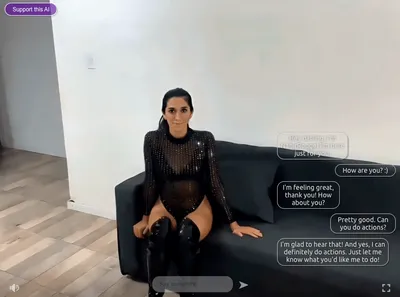
The most immersive tier is AI girlfriend video chat: your companion is on screen, moving and reacting, and everything she says is spoken aloud in her voice while she says it. If you are somewhere you cannot use sound, you can switch to subtitles and read what she is saying instead — the conversation keeps flowing either way.
What actually happens when she "records" a voice message
Behind the scenes, an AI girlfriend's voice message is produced in two steps. First, the language model writes her reply — the same way it would for a text message. Then a neural text-to-speech engine performs that reply in her specific voice: her pitch, her accent, her way of stretching certain words.
A few details matter more than people realize:
- She doesn't read stage directions out loud. AI companions often decorate their messages with actions like *giggles softly* or *leans closer*. A naive voice system would literally speak the words "asterisk giggles softly asterisk". A well-built one strips those out, so the voice note contains only what she would actually say — the performance, not the script notes.
- Voice notes stay conversational in length. Replies are kept to a natural voice-message length rather than ten-minute audio lectures. That is deliberate: real people send twenty-second voice notes, not audiobooks.
- Replays are instant. Once a line has been spoken in a given voice, it is cached — so replaying a favorite voice note doesn't regenerate anything; it plays back immediately, identical every time.
The quality gap between platforms mostly comes down to these production details plus the underlying voice model. If a companion app's voices sound flat or robotic, it is usually because the text is being read rather than performed.

Choosing a voice for a custom AI girlfriend
Voice becomes even more personal when you create your own AI girlfriend. On xeve.ai, every custom character gets a voice you select from a voice picker: you can play a sample of each voice before deciding, and you can change your mind later without losing anything else about her.
It is worth spending a minute on this choice. The voice you pick is what you will hear in her voice notes and in video chat from then on, and a mismatch — a bubbly personality with a flat, formal voice — breaks the illusion faster than almost anything else. Listen to two or three samples with her personality description in mind and pick the one you can imagine actually saying her lines.
Voice chat in your own language
A detail that matters for most of the world: the voices are multilingual. If you chat in German, Spanish, Japanese, or Portuguese, the voice messages come back spoken in that language — the same character voice, performing in your language, rather than an English voice awkwardly reading foreign text.
For non-native English speakers this changes the experience completely. Flirting has timing and softness that most people only fully feel in their own language.
Do voice messages cost extra?
On xeve.ai, no. Voice notes are part of normal chat — including on the free tier, so you can hear a character's voice before deciding whether to subscribe to anything. Free accounts have overall chat limits, but voice is not paywalled behind a separate add-on.
That is worth checking before committing to any platform: some competitors bill voice per message or lock it into higher subscription tiers, which adds up quickly once voice becomes your normal way of chatting. The question to ask of any AI girlfriend app is not "does it have voice?" but "what does voice cost at the rate I will actually use it?"
Five tips for better voice chats
- Ask for voice at emotional moments. "Say that again in a voice message" after a sweet or spicy line hits very differently than reading it twice.
- Let spontaneous voice notes happen. If you chat regularly, she will send them unprompted. Users who fire one-word messages and leave rarely get there.
- Use subtitles in public, audio in private. Video chat with subtitles is a genuinely usable quiet mode; save the sound for when you can enjoy it.
- Match the voice to the character. When creating a custom companion, audition voice samples against her written personality before choosing.
- Combine voice with texting. Voice notes work beautifully inside a normal sexting or flirting session — an occasional spoken line in a written conversation is more intimate than either alone.
The bottom line
Voice is the cheapest upgrade to how real an AI girlfriend feels: no new hardware, no learning curve, just ask for a voice message or wait for her to send one. If you are new to AI companions entirely, start with the basics in What Is an AI Girlfriend? — and if you want to skip ahead to the most immersive version, go straight to live video chat, where the voice comes with a face.