NSFW AI Image Prompts: How to Get Exactly the Picture You Want
Hi, Patrick here. If you have ever typed something like “super hot girl, sexy, perfect body” into an AI image generator and gotten back a picture that looked nothing like the one in your head, this guide is for you. After months of generating AI girls — for my blog, for my own galleries, and honestly just for fun — I’ve learned that the difference between a forgettable render and a picture you actually save is almost never the model. It’s the prompt.
The good news: writing a great NSFW image prompt is not a dark art. It’s a checklist. In this guide I’ll break down the six building blocks every good prompt contains, give you four copy-paste recipes you can use right now, and show you why a guided generator like the one on Xeve.ai often beats a blank text box — especially when you want the same girl across a whole gallery.
The Anatomy of a Prompt That Actually Works
Strip away the mystique and every effective NSFW image prompt answers the same six questions. Miss one, and the AI fills the gap with a coin flip — that’s where the “that’s not what I asked for” feeling comes from.
- The subject: Hair color, length and style, eye color, body type, age range, skin tone. Concrete physical traits, not opinions. “Blonde, long wavy hair, brown eyes, slim” gives the model something to draw; “gorgeous” does not.
- The framing: Close-up or full body? What is the camera actually looking at? This is the single most skipped ingredient, and it’s why people expecting a portrait get a distant full-body shot and vice versa.
- The setting: Bedroom, studio, beach, rooftop, city street. The location quietly controls the lighting, the colors and even the outfit the model picks.
- The mood: Flirty, shy, confident, playful, relaxed. The emotion on her face changes an image more than almost any other single word.
- The style: Photorealistic, cinematic, soft glam, stylized or anime-like. Decide this first — a “realistic anime girl” is a contradiction the model resolves at random.
- What you leave out: Every word that isn’t one of the five ingredients above is noise. Long, rambling prompts don’t give the model more to work with — they give it more to ignore.
Why a Blank Text Box Is Working Against You

Here’s the uncomfortable truth about free-text prompting: the model doesn’t read your prompt the way you write it. Type forty words and it will silently drop a few, blend contradictory ones, and over-weight whatever happens to sit near the front. That’s how you end up with a redhead when you asked for auburn highlights, or two left hands when the prompt got too crowded to leave attention for anatomy.
This is why I like the approach Xeve.ai’s generator takes: instead of a blank box, it asks you the six questions directly. You pick hair color, length and style, eye color, body type, age range and skin tone from menus; then location, framing focus, emotion and visual style. Every building block is explicitly answered, nothing gets dropped, and contradictions are impossible by design. You get the benefit of a well-engineered prompt without writing one — the platform assembles it for you behind the scenes.
If you’d rather skip the choices entirely, there’s a second mode I’ll come back to later: upload a reference image and let the generator work from that. It’s the secret to keeping the same girl consistent across a whole gallery.
Four Copy-Paste Recipes
Each recipe below comes in two flavors: the exact selections to pick on Xeve.ai, and a free-text equivalent you can paste into any generator that still makes you type. Steal them as-is or swap single ingredients — changing one thing at a time is how you learn what each ingredient does.
Recipe 1: The Sunlit Girl Next Door
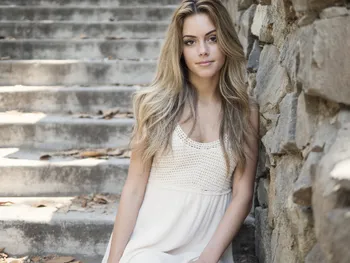
The image at the top of this post is the vibe: natural light, no studio polish, the kind of picture that could be on a real camera roll. Photorealism thrives on understatement — the fewer glamour cues you add, the more real it looks.
On Xeve.ai select: hair color blonde · hair length long · hairstyle wavy · eye color brown · body type slim · skin tone fair · location nature · focus full body · emotion relaxed · visual style photorealistic
Photorealistic photo of a slim young woman, long wavy blonde hair, brown eyes, fair skin, sitting outdoors in soft natural sunlight, relaxed expression, candid full-body shot.
Recipe 2: The Classic Pin-Up in Pink
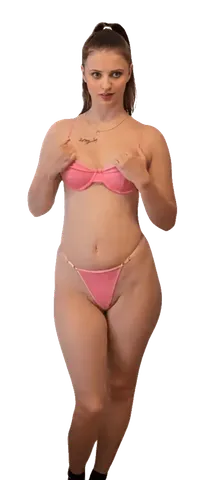
A plain studio background is the pin-up’s best friend: nothing competes with the subject, and the lighting stays even and flattering. Notice how the playful mood reads instantly in the pose — that single selection does more work than any body keyword.
On Xeve.ai select: hair color brown · hair length long · hairstyle ponytail · body type curvy · skin tone light · location studio · focus full body · emotion playful · visual style soft glam
Soft glam full-body studio shot of a curvy woman with a long brown ponytail, light skin, matching pink lingerie set, playful expression, plain seamless background, even beauty lighting.
Recipe 3: The Librarian After Hours
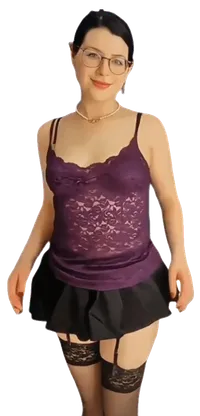
Contrast is the oldest trick in the pin-up book: pair one buttoned-up element (the glasses, the necklace) with lingerie and the image tells a story instead of just showing a body. When a picture feels flat, don’t add more skin — add contrast.
On Xeve.ai select: hair color black · hairstyle bun · body type curvy · skin tone fair · face details a lot of makeup · location living room · focus full body · emotion flirty · visual style stylized
Stylized full-body shot of a curvy woman with black hair in a bun, round glasses, purple lace camisole, black mini skirt and stockings, flirty smile, warm indoor lighting.
Recipe 4: The Neon Dream Close-Up
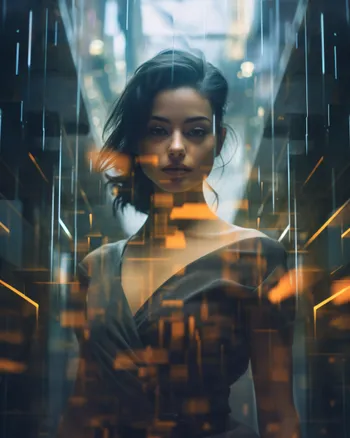
Cinematic style is where you stop imitating a camera and start directing one. Close-up framing plus a city setting gives the model permission to go wild with reflections, haze and color grading. This is the style to pick when you want a picture that looks like a movie still rather than a photo.
On Xeve.ai select: hair color black · hair length medium · hairstyle wavy · skin tone light · location city · focus close-up · emotion confident · visual style cinematic
Cinematic close-up portrait of a confident woman with medium wavy black hair, city lights reflecting around her, teal and amber color grade, shallow depth of field, moody atmosphere.
The Reference Image Trick: Same Girl, Every Time
Here’s the problem no text prompt fully solves: run the same prompt twice and you get two different women who merely share a hair color. That’s fine for one-off images, but useless if you’re building a gallery of your dream girl — or if you’ve already created an AI girlfriend and want new pictures of her.
The fix is generating from a reference image. On Xeve.ai you can switch the input mode from choices to image, upload a picture — one you generated earlier, or a photo of one of the platform’s characters — and the generator keeps the face and body consistent while you change the scene, outfit and mood around her. It’s also the bridge to motion: the same reference image can drive AI video generation, so the girl from your favorite still starts moving and talking.
Five Mistakes That Ruin NSFW Generations
- Contradicting yourself. “Petite and curvy”, “realistic anime” — the model doesn’t warn you, it just picks one at random. Decide before you prompt.
- Vague adjectives doing the heavy lifting. “Sexy”, “stunning” and “perfect” describe your reaction, not the picture. Replace each one with a concrete trait from the anatomy checklist.
- Overstuffing. Past roughly fifteen meaningful terms, every new word steals attention from the others — anatomy errors like mangled hands show up exactly here. If everything is important, nothing is.
- Skipping the framing. No framing choice means the model chooses for you, and it will happily give you a full-body shot when you wanted a portrait. Always pick close-up or full body explicitly.
- Style-goal mismatch. Judging a cinematic render for not looking “real” — or a photorealistic one for being boring — is a settings problem, not a quality problem. Photorealistic for believable, soft glam for flattering, cinematic or stylized for drama, anime-like for fantasy.
The Rules That Keep It Fun
Two lines every reputable platform draws, and Xeve.ai draws firmly: everything generated depicts fictional adults only, and you can’t generate images of real people — no celebrities, no exes, no one who hasn’t consented to being AI-generated. If a tool advertises that it will happily fake a real person, that’s not a feature; that’s a site you don’t want your payment details anywhere near. The guided-choices approach has a quiet advantage here too: the menus themselves keep every generation inside the lines, so you can experiment freely without wondering whether a prompt will get your account flagged.
From Still Image to Moving Video
Once you have a picture you love, the next step on Xeve.ai is making it move. The video generator accepts either a text description or — better — the image you just generated, and produces a short clip of her in motion. Framing, tempo and camera movement become part of the recipe: a slow zoom on a close-up feels intimate, an orbit around a full body shot shows everything off. I’ve written a full walkthrough in my guide to AI video generation, and the step-by-step video guide covers the credit costs and render times.
Frequently Asked Questions
What makes a good NSFW AI image prompt?▼
Do these prompt recipes work on other AI image generators?▼
How do I keep the same AI girl consistent across multiple images?▼
Why do my AI images come out deformed or with wrong anatomy?▼
Is it legal to generate NSFW AI images?▼
Do I need prompt-engineering experience to generate images on Xeve.ai?▼
Final Thoughts: Stop Prompting, Start Directing
The biggest mindset shift for me was realizing that a good NSFW image prompt isn’t written like a wish — it’s written like a director’s shot list. Subject, framing, setting, mood, style. Answer those five questions, leave out everything else, and change one ingredient at a time. Whether you type it into a text box or click it together on Xeve.ai’s generator, the checklist is the skill.
If you want to go deeper into the image side of AI companions, my comparison of the best AI girlfriend apps for realistic images is the natural next read — and if you’re more interested in the erotic art side, the AI girlfriend porn page covers what’s possible in the explicit styles.