Can You Video Call an AI? AI Video Calls vs. Cam Sites Compared
Some links are affiliate links. If you shop through them, I earn coffee money—your price stays the same.
Opinions are still 100% mine.
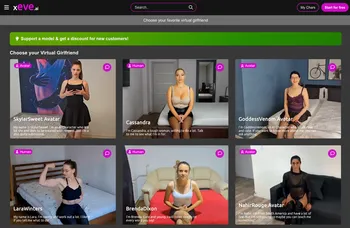
Short answer: yes, you can video call an AI — although it works differently from FaceTime or a Zoom call with another person. On platforms like Xeve.ai, an AI companion appears on your screen and generates her replies and voice dynamically while synchronized lip movements, expressions, gestures, and supported actions create the feeling of a live face-to-face conversation. There is no human performer waiting on the other side — and no single looping clip either. Instead of playing one repeating video, the platform selects and connects suitable movements, reactions, and actions from a large library of pre-produced footage of the character, based on what's happening in the conversation.
That naturally raises the question this article is really about: how does an AI video call stack up against the thing it most resembles — a private show on a cam site? They share a screen format, but they're fundamentally different products. Below I'll break down how AI video calls actually work, where each option is stronger, and how to decide which fits what you're looking for.
What Happens on an AI Video Call — the Short Version
"Video call an AI" might make you picture a static avatar with a robotic voice. The current reality is closer to a real call, though it's assembled differently. In brief, here's what happens on a video-first platform like Xeve.ai:
- An AI writes the conversation: A large language model reads your message in context — including memory of earlier conversations — and writes an in-character reply. Nothing she says is scripted in advance.
- A generated voice speaks it: A neural text-to-speech engine turns that reply into audio in the character's own voice, live.
- Real-time lip sync ties voice to video: Her mouth movements are synchronized to the generated speech as she talks, which is the detail that flips the experience from "chatbot with a picture" to "face-to-face call."
- Reactions and actions are selected, not generated frame by frame: The character's movements, expressions, gestures, and actions come from a large library of pre-produced video segments. Which segments play — and in what order — is decided dynamically in response to the conversation, so it doesn't feel like one canned clip on repeat.
A few practical things worth knowing before your first call: you don't need a webcam, and the AI cannot see or hear you — your camera and microphone aren't used. On Xeve, you interact by typing messages and selecting actions; she answers with voice and video. That's the core difference from a Zoom, FaceTime, or WhatsApp call: the video flows in one direction only. If you're curious about the engineering — the clip graph, the voice pipeline, what happens in the seconds after you hit send — there's a full plain-English breakdown in How Does AI Girlfriend Video Chat Work?, and the AI girlfriend video chat page covers the feature side.
Is It a Real Two-Way Video Call?
Honest answer: "AI video call" is the phrase everyone uses, but the experience differs from a person-to-person call in a few important ways, and it's worth being clear about them.
- You see her; she doesn't see you. The video is one-directional. Your webcam is not transmitted, and you shouldn't assume otherwise on any platform — check what permissions a site actually requests.
- No human is responding. The replies come from a language model, the voice from a speech engine, and the visuals from the character's video library. There is no performer behind the screen.
- It's interactive, not broadcast. Unlike watching a video, what she says and does depends on your messages — so it feels much closer to a call than to a recording, even though it isn't a conventional call.
So if you've searched "can you FaceTime an AI" or "can an AI see you on a video call" — the answer is that today's AI video calls simulate the face-to-face part convincingly, but the AI only perceives what you type or select, not your camera or microphone.

Don't Take My Word for It — Say Hi to Cassandra
The fastest way to understand the difference between reading about AI video calls and experiencing one is to just start a conversation. Cassandra is one of the platform's most popular companions, and you can send her a couple of messages right here in this article before jumping into her full video chat:

AI Video Calls vs. Cam Sites: The Honest Comparison
Now for the main event. Cam sites — think LiveJasmin, Stripchat, or Chaturbate — have been the default "live adult video" experience for two decades. AI video calls are the new alternative. From a product perspective, here's how they compare on the dimensions that actually matter:
| What Matters | AI Video Call (e.g. Xeve.ai) | Cam Site Private Show |
|---|---|---|
| Availability | 24/7 — no schedules, no waiting for someone to come online. | Depends on who's streaming; your favorite performer keeps her own hours. |
| Human interaction | None — the conversation is simulated by AI, however convincing it feels. | A real person is responding to you in the moment. |
| Privacy from another person | No human performer is watching, but your messages and account data are still processed by the platform — review its privacy policy. | A real performer receives your messages and may see you when webcam features are enabled. |
| Personalization | Choose from a gallery or build your own companion — look, style, and personality. | You choose from whoever is streaming right now. |
| Conversation memory | She remembers earlier conversations, so the relationship carries across sessions. | Mostly transactional — unless you become a regular and pay to stay one. |
| Visual spontaneity | Reactions are selected from the character's video library; varied, but transitions aren't always perfectly seamless. | Genuinely unscripted — a real person can do something no one planned. |
| Supported actions | Gestures and actions play on request, but only those the platform supports for that character. | The performer decides what happens — but can improvise anything she's willing to do. |
| Cost model | Free preview to start; a membership subscription for full access; optional credits for image/video generation. Total cost depends on your plan and usage. | Per-minute rates for private shows plus tipping culture in public rooms; total cost depends on time spent. |
| Emotional authenticity | Simulated affection — engaging, but not genuine human emotion. | Real human attention, within the context of a paid interaction. |
| Best suited for | Availability, personalization, fantasy, and freedom from being watched by another person. | Genuine human interaction, spontaneity, and real interpersonal attention. |
Where Cam Sites Still Win
I promised an honest comparison, so here it is. There are things a cam site does that no AI platform can currently reproduce:
- Genuine human spontaneity: A real performer can surprise you in ways no model can — an unscripted laugh, a genuinely bad day, a running inside joke that she started.
- Real human validation: For some people, knowing there's an actual person choosing to spend time with them is the entire point. An AI can simulate attention, but it can't choose you, and it doesn't feel anything.
- Community energy: Public cam rooms have a crowd dynamic — the chat banter, the group goals — that a one-on-one AI call doesn't try to replicate.
And to keep the comparison fair, current AI video calls have real limitations of their own: visual transitions between movements aren't always perfectly seamless, the available actions are limited to what the platform supports for each character, and the AI can occasionally misunderstand a request. Most fundamentally, an AI companion doesn't offer genuine human emotion or consent — it simulates both.
My take: these are two different products that happen to share a screen format. For users who mainly want authentic human attention and unscripted interaction, a cam platform still offers something AI cannot reproduce. For users who value availability, personalization, and freedom from being watched by another person, AI video chat is likely the better fit.
Privacy: What's Different — and What Isn't
This is where the two experiences differ most, and it's worth being precise about it. On a cam site, a "private" show is only private in the commercial sense: another human being is watching you, hearing your voice, and forming opinions. Most people have felt that flicker of hesitation before turning on the camera or typing a request.
An AI video call is asymmetric: you see her, she doesn't see you. There's no performer who might recognize you, and no other person reading your messages. In practical use, that removal of a human observer is what makes many people comfortable exploring things they'd never say out loud. But asymmetric isn't the same as anonymous: your messages and account data are still processed by the platform to run the service and maintain your companion's memory, so it's worth reading the privacy policy of any platform you use. I've covered what to look for in Is AI Sexting Safe?, and the psychology of that judgment-free space in what AI girlfriends actually offer beyond the obvious.
What an AI Video Call Costs on Xeve
Since the cost models are genuinely different from cam sites, here's how Xeve's pricing actually works — no fine print:
- Free preview: You can browse every character without an account, and you get a bundle of free messages plus a live video chat preview before any payment is involved.
- Membership: Full access to video chat, all characters, and premium actions runs on a recurring membership, with monthly, quarterly, and yearly plans (longer plans bring the monthly rate down).
- Credits: Credits are a separate, optional purchase used for generating custom images and videos of your companion — they're not required for live video chat itself. If that generation side interests you, see the AI girlfriend video generator guide.
Whether that works out cheaper than per-minute private shows depends entirely on how you use it — a flat membership favors frequent, longer sessions, while per-minute pricing can be cheaper for a rare short visit. For a full breakdown of Xeve's current prices next to other platforms, see my free AI girlfriend apps comparison.
How to Start Your First AI Video Call (3 Steps)
If you want to feel the difference yourself, the on-ramp is short:
- Step 1 — Pick your companion: Browse the character gallery or create your own from scratch, defining her look and personality before you ever hit call.
- Step 2 — Start the free preview: Jump into a live video chat — the preview is free. Her lips sync to every reply; try asking for a wave or a smile and watch it play out.
- Step 3 — Make it yours: Pin your favorites in My Chars so you can reconnect anytime. If the preview convinces you, a membership unlocks full sessions and premium actions across all characters.
AI Video Call Questions Answered
Can you actually video call an AI?▼
Is there a real person behind the video?▼
Can the AI see or hear me during the call?▼
How much does an AI video call cost compared to a cam site?▼
Are AI video calls private?▼
Can the AI perform actions during the call?▼
Final Thoughts
So — can you video call an AI? Yes, and the current experience is closer to a real call than most people expect: live conversation, a generated voice, synchronized video reactions, and a companion who remembers you tomorrow. It just isn't a conventional two-way call, and it isn't trying to be a human.
Which option is better depends on what you're actually looking for. AI video chat is likely the better fit if you value round-the-clock availability, a companion you can customize, ongoing memory, and the absence of another person watching you. Cam sites are likely the better fit if what you want is genuine human interaction, unscripted spontaneity, and real interpersonal attention. If you're curious about the AI side, send Cassandra a message above or try the free preview on the video chat page — it's the quickest way to see whether the experience is for you. And if you want to compare platforms first, my test of the best AI girlfriends for video is a good next read.